
Sometimes I bring information to a couple of my other WordPress blogs via RSS feed. It’s a nice feature, allowing you to create several posts at once without manual entry. Unfortunately if RSS feed is broken or improperly formatted it can result in blank posts imported into the blog.
I was looking for a WordPress plugin that would allow me to mass-delete empty posts, but apparently none exist. You can delete posts based on date, tags, category, but not the content. Fortunately if you have access to phpMyAdmin of your MySQL installation – there is a solution.
Warning! Backup your database before performing following operations!
In phpMyAdmin locate the database that hosts your blog data. In a standard WordPress installation table “wp_posts” holds all blog’s posts. In case of WordPress MU the table name would be “wp_<blog_number>_posts“, for example “wp_6_posts“. The content of the post in both cases is stored in “post_content” field. So to delete all empty posts in a standard WordPress following SQL query can be used:
DELETE FROM wp_posts WHERE post_content=''
To delete blank posts for a specific blog in a WordPress MU installation, query similar to this one can be used:
DELETE FROM wp_6_posts WHERE post_content=''
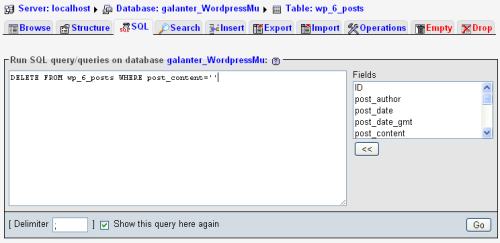
This example assumes you’re working with blog #6.
That is just what i needed. Still no plugin to remove empty posts but this solution works fine.
I am from Russia. Thx a lot. It was so simple. You right It is bad what have not same plagin no where. I have delete about 670 blank posts from 14000 .. it is so mach!!! Thx again !!! And good luck !!!
Good code but there are 2 missing elements.
1. WHERE post_type = ‘post’
If missing this you will delete attachments and empty pages too (some pages use template so they are empty)
2. The post custom fields are still left in the postmeta table, as well as the post terms relationship are left. Will need SQL to remove those es well.
Thanks for sharing.