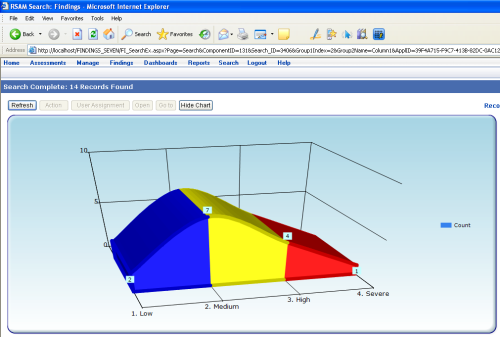
If you’re using MS Chart Control for .NET Framework 3.5 SP1 (in .NET Framework 4.0 it comes as a part of a framework), you may experience a strange behavior when chart images aren’t rendered on the page:

If you’re using HTTP Handler to serve chart images (image URL looks something like “…/ChartImg.axd?i=chart_24dae5cb1f024c4a89f4fe492f05cc59_0.png“) missing mapping in IIS configuration could be to blame Continue reading 'ASP.NET Chart Control is not rendering image'»
I have an existing ASP.NET application that uses Microsoft Charting control for .NET. I created a CCharting class that hold several methods related to getting data for the chart, applying chart appearance etc. Main method of that class is
Public Sub DrawChart(ByVal i_omsChart As Chart, ByVal i_iChartWidth As Integer, ByVal i_iChartHeight As Integer)
As a 1st parameter it accepts actual chart control from the page, 2nd and 3rd are chart width and height. The method then gets the data for the chart, binds chart to that data, applies chart appearance (colors, series, axises) etc. So drawing a chart is a simple as instantiating the class and calling the method:
Dim oCharting As New CCharting
CCharting.DrawChart(xmsChart,500,300)
where xmsChart is a chart control from HTML markup of the page. The result is displayed on the page:

But now I needed to give access to that chart to external applications, that do not have access neither to chart data nor to Microsoft charting control, may run under different OS’s, be Web apps or not. Continue reading 'Serving image from ASP.NET MSChart to external applications via WebService'»
If you’re using Microsoft Chart control for .NET 3.5 you can specify where and how chart images are stored. And if for this purpose you’re trying to use Chart HTTP Handler setting in web config similar to this:
<add key="ChartImageHandler" value="storage=file;url=./Temp"/>
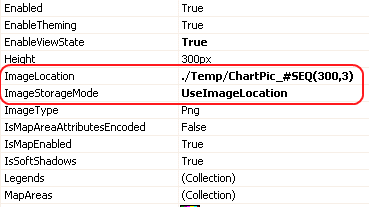
and it is failing (for example chart images are alway created in the root folder of your Web application) – there is an alternative. You can specify location of the images in properties of the chart control itself:

Just add relative path to your storage folder in front of the chart sequence string in “ImageLocation” property. and specify “UseImageLocation” for “ImageStorageMode” property
If you have Windows 7 (or, God forbid, Vista) and trying to run games designed for older Windows version, you may experience 2 issues – game crashes on start and game starts, but displays weird colors. Classic example is “Worms Armageddon”.

Continue reading 'Running older games under Windows 7/Vista'»
Rounded corners add nice touch to look and feel of a Web Page. User interface that employs rounded corners looks more streamlined, more ergonomic. Often to achieve that effect images are used, but this approach doesn’t allow quick style update and has other issues. Fortunately there is another way:
Compare 2 following DIVs:


First uses pretty basic CSS/HTML:
<style type="text/css">
.normal
{
border: solid 1px blue;
background-color:yellow;
height:100px;
width:200px
}
</style>
<div style="text-align:center">
<div class="normal">
</div>
Let’s take a closer look at the second: Continue reading 'Easy rounded corners in pure HTML/CSS'»
Since Dundas licensing scheme turned out to be insane, I was looking for an alternative and found this beauty:

This free control from Microsoft is based on older version of Dundas chart, but offers pretty much the same features and almost the same API (minus some AJAX UI features). It requires .NET 3.5 SP1 and integrates into Visual Studio 2008 toolbar.
Happy charting

This JavaScript VectorGraphics library provides graphics capabilities for JavaScript: functions to draw circles, ellipses (ovals), oblique lines, polylines and polygons (for instance triangles, rectangles) dynamically into a webpage. Usage of this Vector Graphics library should be easy even if you don’t have JavaScript experience
This is very cool. This javascript graphics libary allows you to draw pretty much any shape, image or text directly into HTML without 3rd party plug-ins like Flash. Speed is amazing and it’s cross-browser compatable too. Get it at http://www.walterzorn.de