• Home
  • About
  • Resume

Posts tagged: Data

Opening SpreadsheetML 2003 in Excel 2010

By , 04/14/2011 12:59 PM

If you’re trying to open an Excel 2003 XML file (SpreadsheetML) in Excel 2010 and getting “The file is corrupt and cannot be opened” error, try opening that file in WordPad (it will open as text XML) and save it back. Now try opening it in Excel 2010 again. You will still get “The file you’re trying to open is in a different format than specified by the file extension” warning, but after that the file should open.

Cheat for “These columns don’t currently have unique values” error

By , 02/22/2011 11:20 AM

Ordinary when you create a parent-child relationship between DataTables in a DataSet – there is a requirement that all values of the parent columns need to be unique. If they’re not – you will get an error: “These columns don’t currently have unique values“.

But there’re times when you need to make the relationship work even if those values are not unique. The solution is not to create constrain when creating the relationship. This can be done for example by passing FALSE as value for createConstrains parameter of Dataset.Relations.Add method:

oMyDataSet.Relations.Add("MyRel", _
oMyDataSet.Tables("TheParent").Columns("ParentColumn"), _
dtSet.Tables("TheChild").Columns("ChildColumn"), _
False)

TSQL: Remove duplicate records. Clean and Simple

By , 02/02/2011 5:20 PM

It’s a common scenario, your table has several records with identical values and you need to leave only one, deleting the rest. Here is a generic TSQL query (SQL Server 2005 and above) that does just that in a few lines:

WITH DUP_TABLE AS
   (SELECT ROW_NUMBER()
    OVER (PARTITION BY FIELD1, FIELD2 ORDER BY FIELD1, FIELD2) As ROW_NO
    FROM ORIGINAL_TABLE)
DELETE FROM DUP_TABLE WHERE ROW_NO > 1

Here ORIGINAL_TABLE is your table with duplicates. FIELD1 and FIELD2 are columns with duplicates value (feel free to add or remove columns to suit your needs). Internal query assigns a row number to each duplicate record and DELETE statements that uses that CTE deletes all the rows except the one with Row Number = 1

SSRS Query execution failed … Expected parameter …

By , 01/04/2011 5:34 PM

Consider following scenario: While developing for SQL Server Reporting Services you created a report in Business Intelligent Studio (or generated RDL file elsewhere and then added it to Studio’s project). Everything works fine, you’re able to preview report. And then you need to change Data Source (one example: you created a shared Data Source and now want your report to use it). After you do that any attempt to run the report results in error: Query execution failed … Expected parameter ….

The reason in this case – when you change the data source thru GUI – it resets query used by the report. It can change query type from StoredProcedure to Text and also remove all default query parameters (hence error above).

There’re 2 possible solutions here: First – instead of using GUI, manually change Data Source in the XML source of the report file (in Solution Explorer right mouse click on the report file and select “View Code”). You will have to change it in several places, so be careful. Second – re-create query with its default parameters after changing Data Source in GUI.

WebHierarchicalDataGrid: Manual Load on Demand when bound to DataSet

By , 12/23/2010 10:59 AM

Even though I have my issues with Infragistics WebHierarchicalDataGrid control, it has some neat features and I found that with some tweaks you can make it work.

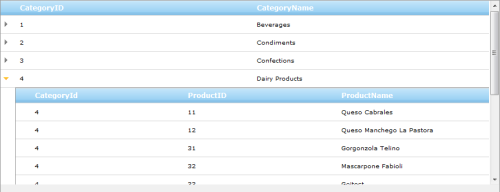
Case in point: Manual Load on Demand. If you have hierarchical data structure, it allows you to retrieve only root level data and then when user clicks “Expand” arrow – get additional data on as needed basis:

Manual Load on Demand in action

This is achieved by handling RowIslandsPopulating grid’s event in which you can run a DB query based on parent row data, then manually create a ContainerGrid object bind it to the data and add it to parent row RowIslands collection:

Protected Sub myGrid_RowIslandsPopulating(ByVal sender As Object, ByVal e As ContainerRowCancelEventArgs) Handles myGrid_.RowIslandsPopulating

     e.Cancel = True

     Dim oData as SomeDataType = GetData()
     Dim oChildGrid As New ContainerGrid()

     e.Row.RowIslands.Add(oChildGrid)

     oChildGrid.DataKeyFields = "SOME_ID"
     oChildGrid.Level = e.Row.Level + 1
     oChildGrid.DataSource = oData
     oChildGrid.DataBind()

End Sub

For this approach to work top-level rows need to display “Expand” arrows that user can click. Continue reading 'WebHierarchicalDataGrid: Manual Load on Demand when bound to DataSet'»

WebHierarchicalDataGrid: Not ready for prime-time

By , 10/21/2010 9:00 AM

I had high hopes for Infragistics Web Hierarchical Data Grid control. Especially in NetAdvantage 10.3 release (current as of this post). Control from Aikido Framework, build on AJAX from ground up, lightweight and fast – I was really excited.

Unfortunately it didn’t turned out exactly as I expected.

First – WHDG cannot bind to a flat ADO.NET data table. Why, you ask, I need to bind flat data to an hierarchical control? Well, it’s the only grid in Aikido that supports OutlookGroupBy mode and I need to be able to group my flat data. But attempt to bind WHDG to DataTable throws an enigmatic InvalidOperationException without giving any clue as why. There’s a workaround – to create a dummy DataSet, add the table to it and bind control to the dataset – but that’s just silly. And that’s not the worst of it. Continue reading 'WebHierarchicalDataGrid: Not ready for prime-time'»

Locate exact match using UltraWebGrid’s client-side “.find()” method

By , 10/07/2010 4:18 PM

Infragistics UltraWebGrid offers extensive client-side Object model and objects at several level of hierarchy offer “.find” method to locate cell with specific data. For example to locate a cell with specific text in a specific column – following code can be used:

//Find cell in first grid column with text "67"
var oGrid = igtbl_getGridById('xmyGrid')
var iLookUpValue = '67'
var oFoundCell =  oGrid.Bands[0].Columns[0].find(iLookUpValue, false)

This works, but unfortunately the “.find” method searches for cell’s text instead of value, thus finding any partial match. In the example above cells with values 567, 671 etc. will be found which is no good in many cases, for example when you’re looking for a numeric ID.

Fortunately the “.find” method accepts regular expression as a search parameter. The solution is to apply “^…$” RegEx expression to perform exact match. So if we change the last line in the code above to:

var oFoundCell =  oGrid.Bands[0].Columns[0].find('^' + iLookUpValue + '$', false)

only exact match will be searched for.

Custom grouping in classic Infragistics UltraWebGrid

By , 08/24/2010 3:54 PM

Infragistics UltraWebGrid offers a nice grouping feature: when the grid is in OutlookGroupBy mode, you can group similar data with very little coding required, you can go from this view:
Before Grouping
to this:
After Grouping
by just dragging columns to designated area.

But what if you want to group by first letter of a name or a year of a date? New WebHierarchicalDataGrid control offers this functionality after 10.2 release of Infragistics NetAdvantage, but if you invested years of work in classic UltraWebGrid – it’s not easy to move to a brand new control cold turkey. There’re other methods that offer custom grouping for UltraWebGrid, but the ones I found were pretty convoluted (like create a hidden column, populate it with data to group by etc.) Here is a simpler approach. Continue reading 'Custom grouping in classic Infragistics UltraWebGrid'»

JavaScript IsDate(): Validate date according browser locale

By , 07/20/2010 1:40 PM

In one of my recent projects I needed to validate whether user’s input is a valid date, and this needed to be done client-side, in browser prior submission to the server. Lazy as I am, I Googled for a ready-to-use code snippet. There’re plenty of versions out there, but most of them offer incomplete solution and none of them take into account browser locale, you know – the language settings:

So I decided to cook something of my own Continue reading 'JavaScript IsDate(): Validate date according browser locale'»

“Cannot find column” DataTable error while grouping or sorting Infragistics UltraWebGrid

By , 05/28/2010 11:08 AM

If you’re binding an ADO.NET DataTable to Infragistics UltraWebGrid and then programmaticaly sort the grid (e.g. add a column to a band’s SortedColumns collection) you may get an error:

Cannot find column My Column Name.

with stack trace starting from grid databinding and finishing in datatable’s sorting:

at System.Data.DataTable.ParseSortString(String sortString)
at System.Data.DataView.CheckSort(String sort)
at System.Data.DataView.set_Sort(String value)
at Infragistics.WebUI.UltraWebGrid.DBBinding.ProcessDataViewForFillRows(DataView dataView, RowsCollection rows)
at Infragistics.WebUI.UltraWebGrid.DBBinding.FillRows(UltraWebGrid grid, RowsCollection rows, IEnumerable datasource)
at Infragistics.WebUI.UltraWebGrid.DBBinding.BindList(IEnumerable datasource)
at Infragistics.WebUI.UltraWebGrid.DBBinding.DataBind(Object dataSource, String dataMember)
at Infragistics.WebUI.UltraWebGrid.UltraWebGrid.DataBind()

If the grid binds OK without sorting and grouping, but fails with either – most likely the culprit is one of the columns in data table. Continue reading '“Cannot find column” DataTable error while grouping or sorting Infragistics UltraWebGrid'»

Panorama Theme by Themocracy

Switch to our mobile site