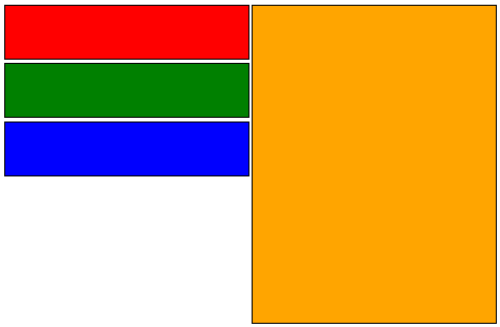
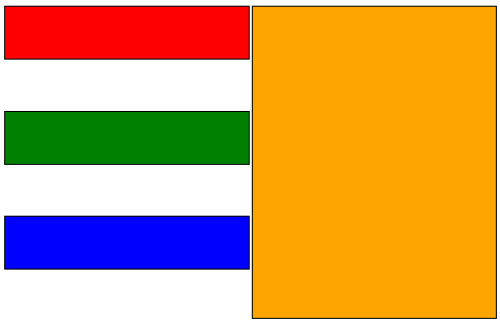
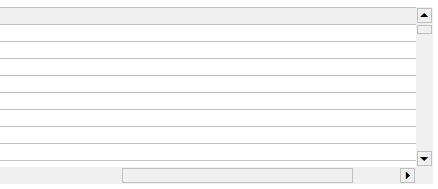
Internet Explorer offer CSS elements to style scrollbars, for example class
.FlatScrollbars
{
scrollbar-face-color: #f0f0f0;
scrollbar-shadow-color: silver;
scrollbar-highlight-color: silver;
scrollbar-3dlight-color: #f0f0f0;
scrollbar-darkshadow-color: #f0f0f0;
scrollbar-track-color: #f0f0f0;
scrollbar-arrow-color: #000000;
}
applied to a DOM element will render nice flat scrollbars:

Yes, it’s not standard CSS, but other browsers offer similar extensions (WebKit, I am looking at you). So, it works nice and well, but what if you want to style scrollbars of an IFRAME? Continue reading 'Style IFRAME scrollbars in IE'»
If you tried to use Infragistics classic UltraWebMenu control in IE9 you may experience issue (even in the latest version, 11.2 at the time of this post) whereby menu items don’t change background on mouse hover even though background is specified in menu’s HoverItemStyle property.
The solution is specify BorderStyle in HoverItemStyle. It can be any value besides NotSet, but the actual attribute has to be there. So for example if you want your hover style to have no borders and your original style looks like:
<HoverItemStyle
ForeColor="White"
BackColor="#81C0E9"
Height="18px"
BorderWidth="0px">
</HoverItemStyle>
change it to
<HoverItemStyle
ForeColor="White"
BackColor="#81C0E9"
Height="18px"
BorderWidth="0px"
BorderStyle="None">
</HoverItemStyle>
I don’t know why border style affects showing of the background, but there you have it. Adding BorderStyle to HoverItemStyle will enable displaying of background color on hover.
onbeforeunload browser’s event fires when the window is about to navigate to another page or about to be closed. So why why would it fire when you click to call a JavaScript function that does neither of the two?
If your have your click setup similar to something like this:
<a href='javascript:doStuff()'>Click to do something</a>
or, if you’re using ASP.NET’s HyperLink control:
<asp:HyperLink ID="xhypMuLink" runat="server" NavigateURL="javascript:doStuff()">
Click to do something
</asp:HyperLink>
And your “doStuff()” function doesn’t redirect or closes the window – you’d expect it just do its stuff and that’s it. But in addition to it, or rather before it onbeforeunload event fires, so if you have some code in the event handler – it will be executed, which in this case is undesirable.
Why does it happen? Continue reading 'onbeforeunload event is fired on click'»
I was working with classic Infragistics UltraWebGrid when noticed strange thing – even though scrollbars were enabled for the grid, the grid had fixed size and number of rows was bigger than the grid could display – no scrollbars appeared. For me it was a combination of grid being shown in a modal dialog in IE7 browser, but it could happen in other scenarios.
I also noticed when grid experienced any kind of user interaction (row added, row selected, checkbox cell checked etc.) scrollbars would magically appear. So the solution? Simulate user interaction. For example this code can be included in grid’s client-side InitializeLayout event:
function xMyGrid_InitializeLayout() {
var oGrid = igtbl_getGridById('xMyGrid')
oGrid.Rows.getRow(0).setSelected(true);
oGrid.Rows.getRow(0).setSelected(false);
}
What happens here is first row of the grid is selected and an instant later unselected. It happens so fast that there’s no visual indication. But the grid gets its “user interaction” and scrollbars appear.
Visited IE test-drive site in my Chrome browser today and was greeted with a cheery banner:

I guess that “Don’t forget to enable your partial hardware acceleration in the about:flags thingy…” is a veiled reference that IE9′s HTML5 is fully “hardware accelerated”. Still funny.
Update: Since Microsoft is abandoning their “native HTML5″ party line the funny logo has been removed as well. Too bad, especially after comparing FPS on speed tests.
IE6 just won’t die. I know, continue to support it is a bad idea, but unfortunately many developers have no choice, some environments, especially corporate intranet will continue to use it until second coming (and then Safari will rule the world).
So, here is a small tip: If you need to use a named color from CSS3+ specification that old tired browser doesn’t understand – just use color’s hex equivalent instead. For example instead of
style="border: solid 1px LightGray;"
which will do nothing in IE6 use
style="border: solid 1px #d3d3d3;"
which will render nice light-gray border.
If you’re using Infragistics UltraWebGrid and experienced an odd behavior where the grid does not display the right-most vertical border line – there’s a workaround.
By default 2 elements contribute to the grid border – border from RowStyleDefault property and border from FrameStyle property. For some reason IE6/7 (yes, some people still use those) do not render the right border of the last column, even though all 3 properties (BorderColor, BorderStyle and BorderWidth) are set. So the solution is to have FrameStyle lend that border:
- Expand RowStyleDefault -> BorderDetails property and set StyleRight to None – this is done, so the double border won’t render in IE8 and other browsers where the border is displayed correctly in the first place
- Expand FrameStyle -> BorderDetails property and set ColorRight, StyleRight and WidthRight properties to the desired color, style and width (e.g. LightGray, Solid, 1px)
As a result, the right border is displayed correctly in all versions of IE.
In one of my recent projects I needed to validate whether user’s input is a valid date, and this needed to be done client-side, in browser prior submission to the server. Lazy as I am, I Googled for a ready-to-use code snippet. There’re plenty of versions out there, but most of them offer incomplete solution and none of them take into account browser locale, you know – the language settings:
So I decided to cook something of my own Continue reading 'JavaScript IsDate(): Validate date according browser locale'»
This is probably a very obscure situation, but it happened to me, it could happen to someone else. Scenario: an ASP.NET page with Infragistics UltraWebGrid inside of a WARP panel. A button outside the WARP serves as a trigger for partial postback. First click on the button causes expected partial postback, but on the second click page does full postback and is screwed after that. The issue happens only in IE6/7, page works correctly in IE8.
Another condition – page contains ASP.NET AJAX ScriptManager control with ServiceReference path pointing to an ASMX WebService.
Turned out the issue was caused by project being left in debug mode (in web.config debug=”true”). Which caused WebService page to be loaded with parameter “jsdebug” in query string. Which apparently IE6 and 7 didn’t like very much. Switching to debug=”false” in web.config solved the problem.
ASP.NET, HTML/CSS, Infragistics, Javascript, Rant
|
browser, bug, dotnet, Error, html, Internet Explorer, Microsoft, solution
As you may be aware Internet Explorer 8 will share session among its different instances (even if you start new instance by clicking IE Desktop icon). Why on Earth this was done is described in this article. The only way to start a new session is to use obscure File -> New Session option in menu, interesting choice, considering that in IE8 menu is hidden by default.
But this is not the end. Quoting the article:
Relying on closing the window to clear the session is not a recommended way to implement proper logoff for an application. Because this clearly will not work if there is another window that is sharing the session.
True, buy why, pray say, session isn’t cleared for one application if its window closed, but another window remains open, pointing to a completely different application, on different server in different DOMAIN?!
Do try this:
- Login to any app that that requires user login.
- Open a new browser, and point it anywhere to a completely unrelated link.
- Close original app window from Step 1.
- Open new browser window and go URL of app from Step 1.
- Surprise, surprise, you’re still logged on.
Also, aren’t they aware that 99.9% of all users will simple close browser window instad of going thru logout process even if it takes only one click? And in many scenarious, including one above user will stay logged in.